This article is Part Four in a series exploring better approaches to project management and development workflows.
- Part 1 - Rethinking Project Management
- Part 2 - Reimagining Project Management
- Part 3 - Closing the Loop on AI-Driven Development
The series began with a simple observation:
Project management often fails not because of people, but because of the systems we ask them to work inside.
In many organizations, the process devolves into something familiar:
- PMs chasing developers for ticket updates
- Developers updating tickets purely for reporting purposes
- Status meetings reconciling conflicting information
Instead of reflecting reality, the system becomes administrative theater — thus I began exploring an alternative approach.
Step 1 — Make Tickets the Source of Truth
The first idea in this series was straightforward:
What if tickets themselves were the source of truth for project state? Instead of manually assembling status reports, project state should be derived directly from the underlying work items.
If tickets are accurate and structured properly, they should already contain everything needed to understand:
- progress
- bottlenecks
- schedule slip
- workflow flow
In other words, status should emerge from the data, not from meetings.
Step 2 — Prototyping Against Jira
To test that idea, I built a prototype that analyzed ticket data from Jira. The prototype pulled ticket information and used it to generate reports showing things like:
- which tickets were on schedule
- which tickets slipped
- possible causes of delays
Conceptually, the approach worked. But the experiment also exposed something important. The real value wasn’t Jira itself. The value was the structure of the data and how it could be analyzed, which raised a natural question.
Step 3 — Do We Even Need the SaaS Tool?
If the real value lies in the ticket data model and the analysis pipeline, why depend on a large SaaS platform at all? Instead of storing tickets in a proprietary database, I experimented with a much simpler approach — tickets stored as JSON documents in Git repositories.
This immediately provided a number of advantages:
- version history through Git
- transparent data structures
- branch-based workflows
- code review for process changes
- no dependency on proprietary systems
At that point the system needed tooling.
Step 4 — Building the CLI Tool
The first implementation was a command-line interface (CLI). The CLI handles core operations such as:
- creating tickets
- promoting tickets through workflow states
- defining dependencies between tasks
- validating ticket structure
- organizing tickets within projects
Tickets themselves remain simple JSON documents committed to the repository. Git provides the audit trail. The CLI provides the operational tooling. This worked well, but it still left one obvious gap. A CLI is great for engineers. Not everyone loves living in a terminal.
Step 5 — Adding a Native UI
To make the system easier to use day-to-day, I sat down with my friend Claude and generated a Swift-based macOS application that sits on top of the CLI tool. The result is a small menu bar application that lives in the toolbar at the top of the screen.
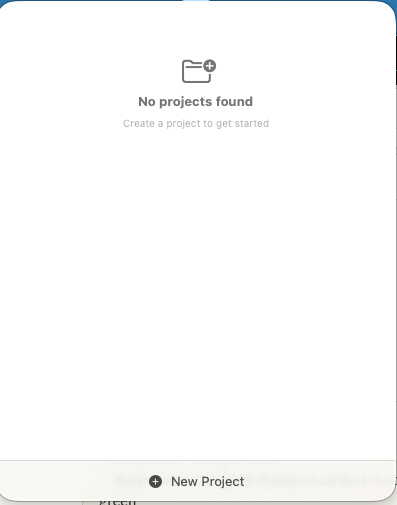
Clicking the icon opens the ticket interface. On first launch, the application checks for existing projects.
In this case there were none yet, so the UI simply showed an empty project list.
Creating a Project
Next I created a project associated with an iOS application I recently wrote called Emberlog. Once the project exists, the application displays the ticket list for that project. Since the project was new, the list started empty.

Creating a Ticket
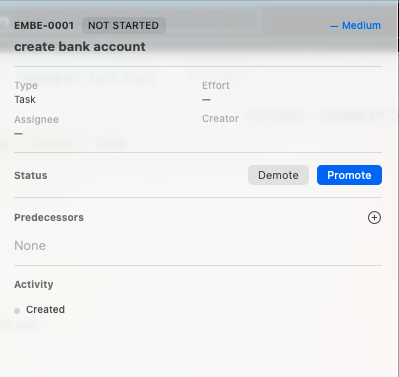
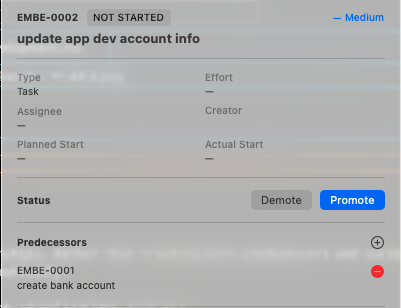
I then created the first ticket for the Emberlog project. Each ticket contains fields such as:
- task description
- effort estimate
- creator
- workflow state
- dependency relationships
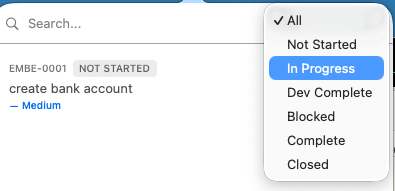
One design choice here is worth highlighting. Most ticketing systems require users to manually select the next workflow state from a dropdown menu. This system does something simpler. Instead of choosing states, you just press Promote. The system automatically moves the ticket to the next step in the workflow.
The goal is simple:
- Reduce unnecessary cognitive overhead.
Modeling Dependencies
Project scheduling is handled through predecessor relationships. Rather than tracking both predecessors and successors, the system only stores predecessors. Successor relationships can be derived automatically.
This simplifies the data model while still enabling project visualizations such as:
- dependency graphs
- project timelines
- Gantt-style planning views
Early Results
At the time of writing, I’ve been using the tool for a couple of days across several personal and internal projects. So far the experience has been encouraging.
The system feels:
- lightweight
- fast
- easy to reason about
- tightly integrated with Git workflows
Of course, two days of usage is not a definitive evaluation. The real test will be sustained usage over the coming weeks.
Closing Thoughts
One of the goals of this series has been to demonstrate a full engineering cycle:
- Identify a broken process
- Propose a better model
- Prototype the idea
- Build the tooling
- Use it in real work
There’s a big difference between talking about better systems and actually operating inside one. This article marks the start of that final step. Now we’ll see how well the idea holds up in practice.