
This is part three in a series. Part one was my opinion on why project management is broken — not so much the people, but the processes we use. Part two was me exploring a solution with Claude, which resulted in a project management tool with a JIRA connector. You could pull ticket information and generate a report showing tickets that were on time, tickets that were late, reasons for slips, that kind of thing.
Part three came about because a friend of mine, Roger, hit me on Slack and asked, “Hey, that was an interesting article — what would you see as the next steps?” Good question. I typed out a response, and unfortunately that got my brain going. I couldn’t stop. I sat down and started thinking through what I actually needed, and in that process I discovered a few things.
It started with a simple question: I’ve got this tool integrated with JIRA — what’s next? The more I thought about it, the more I realized that JIRA and all the other defect tracking systems out there — and there are literally hundreds of them — are fundamentally flawed, particularly in today’s world of AI. The core problem is proprietary databases. All your ticket information lives in a proprietary database, either managed under the hood of a SaaS system or, if you’re running something open source, sitting in a database you have to maintain yourself. It’s just a proliferation of tools.
My preference is to use Git and JSON as the fundamental building blocks for everything. Git handles storage and diffing. JSON complements that because it’s text-based, which means you can also set it up to be natively readable by machine learning and LLMs. It solves a lot of problems at once.
So I sat down, used Claude Code, and built a bug tracking tool. Right now it’s a simple command line tool, but as I got into it, something clicked. If you’ve worked with Claude, you know the flow: you describe what you want to build, it asks some clarifying questions, comes back with a plan, and then asks if it can execute. That’s when the light bulb went on.
I’ve got a ticket tracking system. I’ve got a project management system. And I’ve got Claude, which can generate a plan. So what if, when Claude creates a plan, it also creates all the tickets it needs to execute that plan — and then updates them as it works through them? In the ticketing system I built, tickets move through states: created, in progress, and through to done. Getting Claude to do exactly that was the final closing piece, and it is absolutely phenomenal.
Here’s why it matters. On several side projects, I’d ask Claude to make a change, it would go into plan mode, identify a list of tasks, and execute them. I’d compile, run, validate, and then go to check things in — and in one case, 200 files had changed. Not necessarily dramatically, but 200 files. Claude made all 200 changes, and I didn’t have a detailed record of what each one was. I’m outcome-focused rather than trying to become a Swift expert, so I don’t have a problem with that in principle. But with this structure in place — where Claude creates and manages tickets as it executes a plan — it would have logged exactly what it did. It actually comments the tickets: “Edited lines 16 through 35 of the bash file to do X.” That completely closes the gap.
This isn’t unique to Claude either. I’ve used Codex. Same situation — makes a bunch of changes, you’re happy with them, but you don’t have a clear record of what they were. This solves that.
Seeing It in Action
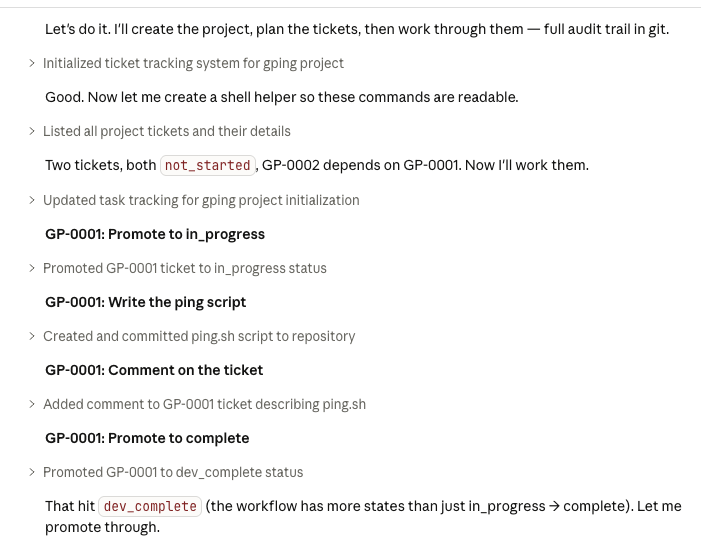
So I actually tried this. What you see in the first image is where I kick it off — I tell Claude “let’s do it” — and you can see it start creating tickets and running through them.
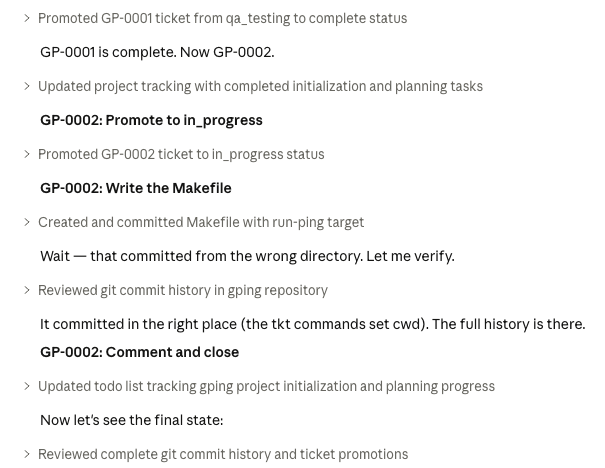
The second image is a continuation of that, showing the steps as it works. Where it says “created and committed ping.sh script to repository,” that’s exactly what it sounds like: it created a local Git repository, committed the code, and promoted the tickets. The ticketing tool I wrote has this concept of ticket promotion, and you can see that happening in real time.
The next image is just a continuation, and at the end of it you get to the final state — a summary. This is really the full expression of that light bulb moment. I had asked Claude to create a bash script that pinged Google every so often and did a few other things. From the summary you can see all the commits — those hexadecimal hashes — and you can see it created two tickets, started work, did a promotion, added the shell script. Actual code, fully walked through step by step.
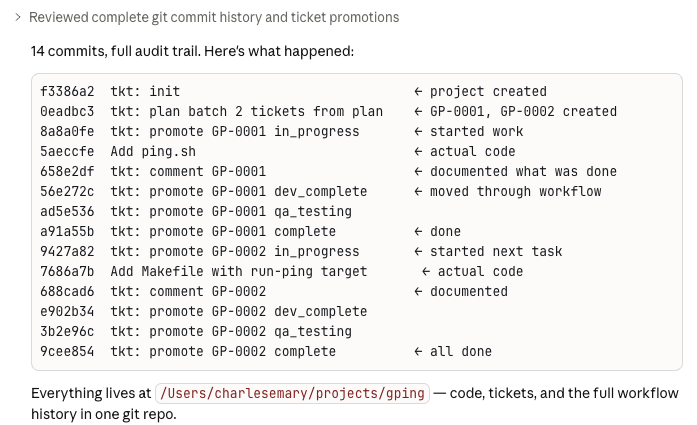
This is the genius of the approach. There’s no guessing anymore about how a change came about. Because Claude is in plan mode, creating tickets and then doing the work, you know exactly what it did and why. That’s true for any LLM, not just Claude.
And there’s another dimension to this. If you later need to come back and fix something, you can point Claude at the ticket and say, “In ticket whatever, you introduced a defect. Read the ticket, read the code, create a new ticket to fix it with the relationship between them, and go fix it.” The LLM handles the whole thing — and you end up with full documentation and full traceability.
I’ve got some other projects I want to work on, and I’m thinking about making one of them part four in this series — so readers can see this concept play out in practice, not just in theory.
As always, if you’ve read this, I appreciate your time. Everyone’s busy. If you have comments, leave them on my LinkedIn page — that’s the only social media I’m on. Take care.
AI Disclaimer
Everyone is using AI now — or at least most people in the tech world are — and there’s this concept of “AI slop.” I want to address that upfront as part of my normal workflow.
The way I work is I dictate. I dictate because it gives me a much better free flow of ideas. I take that dictation and hand it to one or more LLMs and ask them to clean it up. When I do that, I specifically say: don’t change my voice, don’t change the tone, don’t change my wording.
I have a decent vocabulary, I use certain words, and I don’t want the LLM swapping them out for bigger or smaller ones. Just clean up the unclear thoughts — because when you dictate, sometimes you babble. That’s it.