Every data project has the same shape. There’s the interesting part: the analysis, the dashboard, the conclusion you get to draw. And there’s the unglamorous part that comes first, where you find out your inputs don’t mean what the column headers say they mean.
Professionally I know this. I’ve watched more than one confident conclusion evaporate when someone finally checked how a field was populated. What I hadn’t done was apply the same skepticism to my own household budget.
I’d been running one in Actual Budget for a while: four accounts at a credit union, a couple of credit cards. I’d look at the numbers monthly, draw conclusions, and adjust. The conclusions were wrong, because the numbers were wrong, and the numbers were wrong for reasons that were completely invisible from the reporting layer.
Last week I sat down to fix a narrow technical annoyance with my bank’s export files and ended up rebuilding the whole thing. Along the way I found a category that had absorbed $2,527 of spending that had nothing to do with it, a lot more interest than I’d expected hiding under a label I couldn’t parse, and 21 of 22 rules that had never once matched anything.
None of that was visible from the budget screen. All of it was visible in the data, if you went and looked.
Here’s the whole thing, in the order it happened.
Act One: the export files don’t say what you think they say
The narrow problem I set out to solve: my credit union exports each account as its own OFX file, and transfers between my own accounts import as garbage.
If I move money from the main account to the bill-paying account, that’s one event. But it appears in two separate files as two unrelated transactions:
Main    06/22   -88.61    Transfer To account 2d5b6
Bills   06/22   +88.61    Transfer From account 4e1c8
Actual has no way to know those are the same transfer. So they import as two independent transactions: one looks like an expense, the other like income. Every internal transfer double-counts in reports. On a hub-and-spoke setup like mine, where nearly everything flows through one account, that’s not a rounding error. In three months of data there were 122 transfer legs across 269 transactions. Nearly half the ledger was noise.
The second problem was worse, because it was silent.
The bank truncates the part you typed
When I move money, I usually type what it’s for. So the memo reads Transfer To account 9a7f2 Groceries. That’s the useful bit.
Except OFX has two text fields, and Actual uses NAME as the payee. NAME is capped at 32 characters, MEMO at 64. And my bank fills both with boilerplate first:
MEMO: Transfer To account 9a7f2 4e1c8 to 9a7f2 REF # 86396 Groceries
NAME: Transfer To account 9a7f2 4e1c8          <- 32 chars, "Groceries" gone
Count the prefix: account numbers and a reference number eat most of the 64 characters before my own words get a look in. Whatever I type at the bank survives for about ten characters.
Eighteen memos in three months were cut off mid-word. Breakfast, new shoes, gutter and pex s. Greenhous. landsca. That text is destroyed at the source: not recoverable, not reconstructible.
So the thing I’d been diligently doing, labelling my transfers, was being thrown away before it ever reached the budget. This is the first lesson of any data cleanup: the field exists, it’s populated, and it still doesn’t contain what you think.
Building the mapping
The fix was a small Python tool that rewrites the OFX files before import. Not a parser, a rewriter. It locates the byte ranges of the NAME and MEMO fields and splices new text in, leaving every other byte untouched.
That constraint matters more than it sounds. Bank OFX is non-conforming SGML: unclosed tags, odd headers, legacy encodings. Parsing it into an object graph and re-emitting it loses quirks the importer may depend on. Splice, don’t reserialize.
Two invariants drove the design:
- Never touch
FITID. That’s the transaction ID Actual uses to avoid duplicate imports. Change it and re-importing a file creates a second copy of your entire history. - The rewrite must be idempotent. Run it twice, get byte-identical output.
That second one bit me almost immediately. On one account the tool wrote account 7b3e9 into the memo. On a second pass its own output re-matched the pattern it was looking for, and the separator compounded:
pass 1:  Transfer from account 7b3e9 - Final shed payment
pass 2:  Transfer from account 7b3e9 - - Final shed payment
pass 3:  Transfer from account 7b3e9 - - - Final shed payment
The fix strips a leading separator on re-parse, which makes the operation idempotent by construction rather than by hoping the pattern never re-matches. There’s a regression test pinning it, because that’s exactly the class of bug that would quietly eat a memo six months later.
Then came the mapping files, which turned out to be most of the actual work.
Account mapping got easier once I stopped doing it the obvious way. My first instinct was to scan memos for account numbers. That’s wrong: the longer memos contain both accounts (4e1c8 to 9a7f2), so a substring search matches the file’s own account as well as the counterparty. The reliable signal was the phrase Transfer To/From account NN, which appeared on 122 of 122 transfers.
Purpose mapping was the fiddly part. Half my transfers had a purpose typed at the bank; the other half were bare. I could have hand-labelled 30 transactions and moved on, but they turned out to be regular: 26 of the 30 collapsed into 12 recurring patterns with the same amount on the same day each month:
recurring:
  - from: "Main"
    to: "Bills"
    amount: 210.00
    day: 5
    tolerance_days: 3
    purpose: "credit card payment"

  - from: "Main"
    to: "Bills"
    amount: 88.61
    # no `day`: this one lands every ~14 days, not monthly
    purpose: "pet meds"
Twelve rules instead of thirty one-offs, and they keep working next month. That’s the difference between a cleanup and a pipeline.
One design decision I’m glad I made early: purpose is declared, never inferred. I considered having the tool guess, matching a transfer to the debit it funded a few days later. It would have worked most of the time. But a wrong purpose written into a memo is invisible once imported, and it quietly misattributes spending. Declared-only means the tool is sometimes unhelpful and never wrong. In a financial system, silent-and-plausible is the worst failure mode there is.
By the end of Act One the imports were clean: transfers linked, purposes preserved, counts and amounts matching the source files to the cent.
That’s when the real problems showed up.
Act Two: the Sankey chart was lying to me
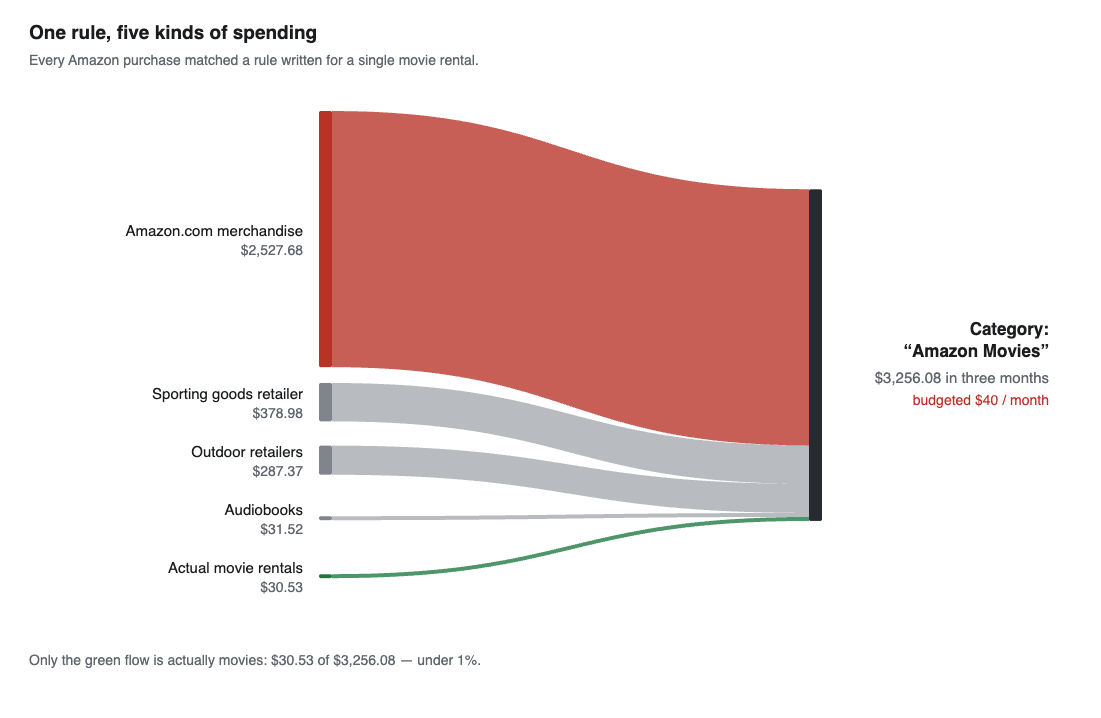
With clean data in, I pulled up a Sankey diagram of where the money goes. One flow was absurd: roughly $2,400 into a category called “Amazon Movies.”
I did the arithmetic in my head. Five dollars a rental, four movies on a good weekend, that’s twenty. Call it eighty a month at the absolute outside. Where does $2,400 come from?
So I went and counted:
| What was in “Amazon Movies” | Transactions | Total |
|---|---|---|
| Amazon.com merchandise | 80 | $2,527.68 |
| A sporting goods retailer | 1 | $378.98 |
| Another outdoor retailer | 3 | $272.37 |
| Audiobooks | 2 | $31.52 |
| Actual movie rentals | 4 | $30.53 |
Ninety-one transactions, $3,256 total, of which $30.53 was movies.
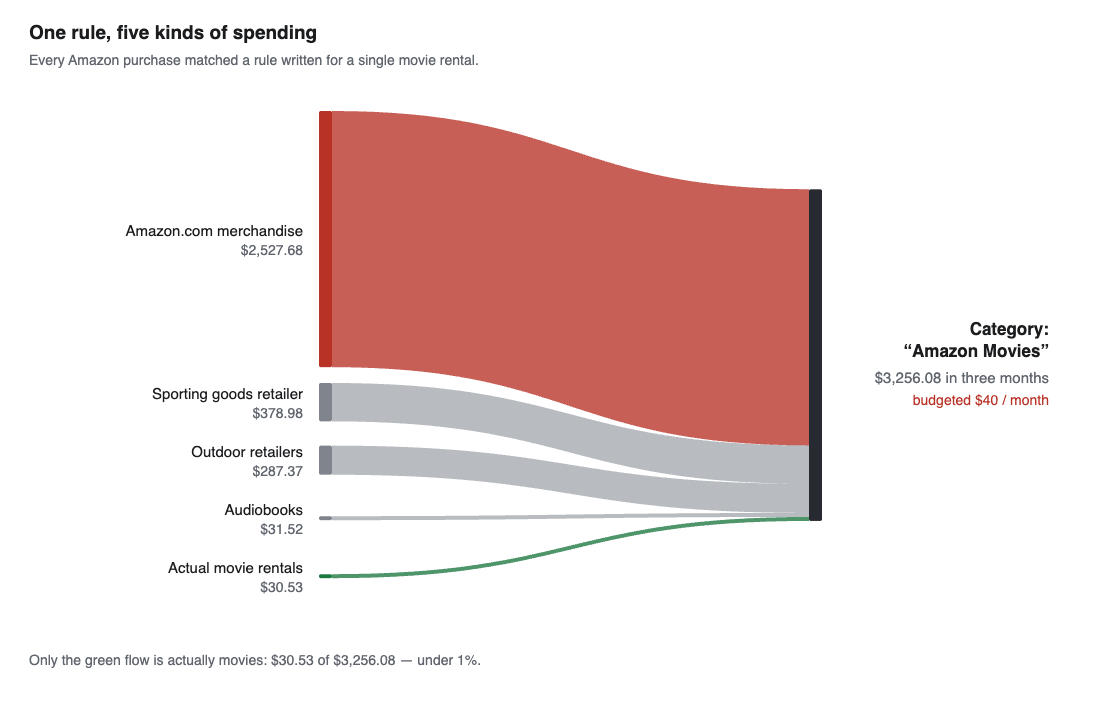
The chart I’d been reading every month. Four of those five flows had no business being there.
The cause was a single rule:
payee is Amazon -> category Amazon Movies
At some point I’d bought a movie on Amazon, categorized it, and let the app create a rule from that. From then on every Amazon purchase (dog food, tools, whatever) flowed into “Amazon Movies.” A second rule did the same with a sporting goods store, for reasons I can no longer reconstruct.
Here’s what makes this more than an amusing mistake. The category was budgeted at $40 a month. In one month it took $317.99. So every month it showed as wildly overspent, and every month I treated that as an overspending problem, because the alternative explanation, that the number was measuring something else entirely, never occurred to me. The metric was consistent, it was visible, and it was measuring the wrong thing.
And the data separates cleanly. It always did:
#5V0HDRHX2RFF  AMAZON.COM*5G9HC5R73 SEATTLE WA     <- merchandise
Prime Video *CE5NW4EJ3 888-802-3080 WA             <- movie rental
AMAZON PRIME*9B1F15633 Amzn.com/bill WA            <- membership
Three distinguishable patterns. The problem wasn’t the source data. It was that the rule matched after everything had been collapsed into a single “Amazon” payee, by which point movies and dog food were indistinguishable. The information was destroyed by my own normalization step, which is a very ordinary way for a pipeline to go wrong.
Once I pulled that thread, more came apart:
- A liquor store, a brewery, and a tea subscription were all in “Drinks,” making it look 3× over budget. Two of the three didn’t belong. Move them and the category was essentially on plan.
- A $1,299 hunting trip was in “Eat Out,” because it came through as a Square charge. One transaction, six times the monthly food budget, filed under restaurants.
- One rule for a home improvement store was lumping together three unrelated things: store purchases, monthly payments to that store’s credit card, and account-verification micro-deposits of eight cents. The card payments were ~$400/month counted as spending, on top of the purchases they were settling.
And a third of my rules had never run
While rebuilding, I checked whether my rules actually matched anything. Twenty-one of twenty-two keyword rules matched nothing at all.
The reason is a detail I’d never had cause to think about. The app stores two payee fields: the cleaned-up one you see, and the raw text from the bank.
payee            "The Home Depot"
imported_payee   "AUTOPAY CO: HOME DEPOT      ID:"
My rules matched the title-cased version. The raw text is upper case. Case-sensitive comparison, zero matches, no error, no warning. The rules sat in the UI looking perfectly reasonable and doing nothing.
Fifty-four more rules had a subtler version of the same problem: they matched the exact raw string, which included per-transaction order IDs:
imported_payee is "Chewy.Com 800-672-4399 Fl 05/09/"
That matches exactly one historical transaction and can never match again. Eleven such rules existed for Amazon alone, one per order number. Replacing them with a single contains "AMAZON.COM*" collapsed 54 brittle rules into about 20 durable ones.
This is the part I’d flag hardest to anyone doing similar work. A transformation that silently does nothing is worse than one that fails. Every one of those rules was evidence, to me, that the categorization was under control.
Act Three: what am I actually budgeting for?
By this point the old file wasn’t worth repairing. The history was a patchwork: two accounts had no transactions at all before a certain date, the others had partial hand-entered records that couldn’t be reconciled to anything.
So: new file, structure replayed in programmatically, clean start from a chosen month.
The migration isn’t the interesting part. The interesting part is that re-creating every category by hand forced a question I’d never asked: am I actually funding this, or just labelling it?
The answers were uncomfortable.
- A trash service, budgeted $40/month. Zero transactions, ever, in any account. A guess that had calcified into a line item.
- Vehicle maintenance, $120/month. We don’t set that aside. We pay for repairs when they happen.
- A “future” group with nine categories (propane, septic, tools, clothing), every one budgeted at $0. Not sinking funds. A list of things I didn’t want to forget, taking up space and doing nothing.
The category that had been hiding
The worst was named Interest Accrued. The name meant nothing to me. I assumed it was interest earned, because it sat next to a “Dividend Accrued” category that really is income and totals $3.49.
After reviewing it, I realized this had been auto-added somewhere along the way and was actually interest I was paying, on a credit card, for example. That was a real eye-opener. I was paying more interest than I expected.
I renamed it INTEREST PAID TO BANKS. In caps. If a label is the only thing standing between you and a number that size, it shouldn’t be subtle. Naming is not cosmetic; it’s part of the data model, and an opaque name is a defect.
A bucket for things with no plan
What came out of this was a structural change worth stealing.
I made a category group called Not Budgeted, set every category in it to $0, and moved into it everything I wasn’t genuinely funding: interest, medical, vehicle maintenance, propane, septic, taxes, and general merchandise.
The reasoning: the budget had been quietly pre-approving spending. If a category holds $200, spending $200 feels like success. But I wasn’t setting that money aside; I was writing down a number and then spending whatever I spent.
At $0, every dollar landing there reads as overspent. It converts an unexamined allowance into a visible signal.
The trade-off is real: that bucket will show red permanently, by design. A vet emergency looks the same as an impulse buy. It only stays useful if the monthly review actually happens and the recurring, legitimate items graduate into funded categories. Skip the review and you’ve built an alarm you’ll learn to ignore.
The plan moved like this:
Before:  $4,609.67/month budgeted
After:   $4,194.52/month budgeted
Actual spending didn’t change at all. About $415/month moved from “planned” to “visible but unfunded.” What’s left in the funded group is a short list where I can point at a real recurring charge for every line.
What I’d tell someone starting this
Check whether your transformations actually fire. Mine looked correct and did nothing for months. If your tool distinguishes raw from normalized fields, find out which one your rules match and what case the raw data is in. Highest-value hour I spent.
Audit your biggest number, not your most annoying one. I’d been staring at overspent categories for months. The real problem sat in a category I’d never questioned, because its name sounded harmless.
A category is a label, not a plan. Money assigned to it is the plan. I had this backwards long enough for a dozen categories to exist as vague intentions while presenting as a budget.
Rename anything you can’t explain in one sentence. “Interest Accrued” cost real money by being boring.
Automate what’s mechanical; refuse to automate what’s judgment. The tool rewrites memos, resolves accounts, applies declared purposes. It does not guess what a transfer was for. Every time I was tempted to add inference, the failure mode was silent and wrong.
The payoff
The part I underestimated was how much of this was data engineering rather than budgeting. Mapping files, validation, regression tests, checking that a rule fires before trusting what it implies. None of it shows up in the final report, and all of it determines whether the report means anything.
Two things came out of it.
The manual entry is gone. Before, keeping this current meant hand-entering and hand-correcting transactions, which is exactly the kind of chore that gets skipped for three weeks and then feels insurmountable. Now it’s: download the files, run one command, import. The transfers link themselves, the purposes are attached, the categories are assigned. A system that doesn’t depend on my willingness to do tedious work each month is a system that will still be accurate in six months.
And the picture is finally realistic. That’s the part I didn’t expect to matter as much as it does. I can look at where the money goes and believe it, which means when something looks wrong now, it probably is wrong, rather than being an artifact of a rule I wrote two years ago and forgot. It’s eye-opening in ways that aren’t all comfortable. The interest number in particular is a different conversation than the one I thought we were having.
Which is the whole point, and it’s the same lesson as any professional data work: you cannot analyze your way out of bad inputs. Garbage in, garbage out isn’t a warning about obviously broken data. Obviously broken data gets caught. It’s a warning about data that looks fine, populates every field, renders in a chart, and quietly means something other than what the label says.
I spent most of this project on plumbing and almost none of it on insight. Then the insight took about ten minutes, because once the inputs were right the conclusions were sitting there in plain sight.