
Every day, feeds are filled with articles warning that AI is “taking jobs.” I’ve written some of those myself. And while there are real implications worth discussing, there’s another reality we don’t talk about nearly enough:
AI is already here, and it has real, practical operational value—right now—at the individual level.
This article isn’t about replacing people. It’s about Micro-AI: small, targeted uses of AI that improve personal and professional efficiency without trying to automate entire roles, teams, or organizations.
What I Mean by “Micro-AI”
Micro-AI is not about end-to-end automation.
It’s about:
- Small, bounded tasks
- Human-in-the-loop validation
- Using AI where thinking, not precision, is the bottleneck
Micro-AI shines in non-deterministic work—situations where the “right” answer isn’t fixed and the value comes from synthesis, organization, or translation.
BUT: The Camel in the Tent — Hallucinations Are Real
Before getting into examples, we need to address the obvious concern: hallucinations.
They’re real. I’ve encountered them many times. Ignoring that fact is how people misuse AI.
The real risk isn’t that AI can be wrong—it’s that you may not be able to tell when it’s wrong.
If I ask an LLM to generate a slide deck on quantum string theory, I’m immediately in trouble. I don’t know enough about the subject to validate what it produces. If it’s incorrect, I won’t know it’s incorrect.
That leads to the first rule of Micro-AI:
AI should operate inside domains where you already have enough expertise to validate the output.
With that boundary in place, Micro-AI becomes extremely effective.
Example 1: Inverting the Slide-Deck Workflow
I do a lot of architecture work. Historically, building a slide deck meant outlining, creating agenda slides, filling bullet points, and thinking through the argument while writing.
That works—but it’s slow, and it doesn’t match how I actually think.
I think best while pacing, gesturing, and talking things through out loud.
So I inverted the workflow.
I turn on transcription and talk through the idea—messy, nonlinear, backtracking included. Then I hand that transcription to an LLM and ask it to organize my thoughts, propose an agenda, and generate slides.
I review the agenda first, answer questions, then generate the deck—and finally, I review everything manually.
The result? What used to take 30–40 minutes now takes 15 minutes or less to reach a usable first draft.
That’s Micro-AI.
What Micro-AI Is Not
Micro-AI is not a good fit for deterministic workflows.
If you have:
- A CSV that arrives every day
- A fixed transformation pipeline
- A guaranteed, repeatable outcome
You don’t need AI—you need automation.
AI introduces variability. Deterministic problems require predictability. Mixing the two is a mistake.
Example 2: Generating Diagrams by Describing Them
Another place Micro-AI works extremely well is diagram creation.
There are excellent tools for drawing flow diagrams—Draw.io, Miro, Lucid, and many others. But they all share one characteristic:
They’re manual.
You drag boxes, connect arrows, adjust spacing, tweak alignment—and if the flow changes, you often repeat the process.
There’s another approach.
Describe the Diagram Instead of Drawing It
Using a lightweight diagram language like Mermaid, you can describe a workflow in plain text:
- Step A leads to Step B
- Decisions branch here
- Parallel processes happen there
Instead of manually drawing, you describe the flow—exactly how you already think about it.
This is where Micro-AI comes in.
You can:
- Describe a workflow in natural language
- Ask AI to generate a Mermaid diagram from that description
- Review and tweak the output
- Regenerate until it matches your intent
If you can explain it, you can diagram it.
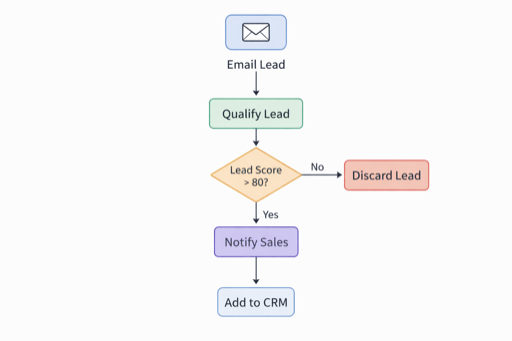
  A([Email Lead]) --> B[Qualify Lead]
  B --> C{Lead Score > 80?}
  C -- No --> D[Discard Lead]
  C -- Yes --> E[Notify Sales]
  E --> F[Add to CRM]
Why This Is Powerful
This approach has several advantages:
- Speed – diagrams emerge in seconds, not minutes
- Iteration – changing a diagram is as easy as changing text
- Portability – the output is plain text you can store, version, and share
- Durability – diagrams can be checked into repositories or reused later
You’re not locked into a canvas or tool. The diagram becomes an asset, not a screenshot.
And once again, the human stays in control:
- You define the intent
- AI does the translation
- You validate the result
That’s Micro-AI in practice.
The Pattern to Watch For
Micro-AI works best when:
- Humans produce messy or abstract input
- AI organizes or translates it
- Humans validate and finalize the output
AI isn’t the decision-maker. It’s a force multiplier.
Final Thought
AI isn’t just about massive automation or job displacement.
Used correctly, it’s a set of small tools that can reclaim time, reduce friction, and improve how individuals work today.
That’s Micro-AI.
And once you start looking for these leverage points, you’ll find them everywhere.