
The tool is called hate. It is a project management/ticket tracker, and yes, that is the name on purpose.
hate is the human agentic tracking engine, git-based, storing tickets as files in the repository alongside the code they describe. No external system, no separate database, no API to sync against. A ticket is a file. Its history is the repo’s history. The name is a joke that stopped being one somewhere around the third project, because a tracker built this way earns a kind of affection that Jira has never once inspired in anybody.
It answers a lot of a project manager’s questions already. What is open. Who has it. What shipped this week. What is blocked and on what. Where a decision got made and by whom, because the decision is in the repo next to the code it produced.
What it could not answer was the question that actually keeps a project manager up. Are we going to run out of hours before we run out of work?
Nothing in the tool watched the clock. You could log time all day against a project that was quietly bleeding out, burning hours faster than it was closing work, and never see the wall coming until you hit it. The data was all there. The tracker just was not asking anything of it.
So I spent a day fixing that. What follows is the stack of changes, in the order they happened, and more usefully, why each one is shaped the way it is. The interesting parts are not the features. They are the two or three moments where the obvious design was the wrong one.
The first number: spent versus projected, honestly
The obvious start: sum the estimated hours across a project’s tickets, subtract what has been logged, show the gap. One problem. There was no per-ticket “estimated hours” field to sum. The only sizing that existed was t-shirt effort (XS through XL) mapped to days.
So I derived projected hours from that mapping, and then did the important thing. I labeled it a sizing budget, never a precise estimate. A rough number you are honest about beats a precise-looking number you cannot back up. Next to it went an estimate-variance report, which finished tickets came in over or under and by how much, scoped to completed work, because an in-flight ticket under its estimate has not “come in under.” It is just not done yet.

Sharpening the ruler: quarter-day sizing
The t-shirt sizes mapped to whole days, so the smallest thing you could estimate was a full day. You cannot bid a two-hour task on a whole-day grid. I changed the size-to-days mapping to accept quarter-day increments.
Small idea, wide blast radius. It turned a whole-number field into a fractional one across the scheduling and baseline code. But it is the change that lets the sizing budget land on real numbers instead of rounding everything up to the nearest day.
The feature I deleted before building it
Then the part worth writing down. I spent a long design conversation building toward a proper estimation model: take the hours from a functional size analysis, distribute them into a per-ticket “allocated hours” field, freeze a project bid at the moment you win the work, and reconcile the bottom-up ticket totals against that top-down commitment. Coverage gaps, drift detection, the works. (The functional sizing half of that idea is a real technique and it is worth its own read: see Measuring AI Productivity With COSMIC Function Points .)
It was a good model. It was also too much. The verdict, “I think it has to be simpler,” killed the whole apparatus, and what replaced it was a single number in Settings: a maximum-hours cap per project, with the dashboard tracking total logged hours against it.
The best version of that feature was the ninety percent of it I did not build.
Everything after this got simpler to reason about because the budget was just a number, not a reconciliation engine.
Strict time: killing the silent slip
Sizing gives every ticket an allotment. A new per-project toggle turns that allotment into a soft wall. Logging time that would push a ticket past its allotted hours gets blocked, unless the person confirms they are authorized to extend and records a reason.
For a consulting shop this is two features, not one, and both have to be there.
The first is detection. A developer hits a task you sized at eight hours and it is going to take eighteen. That is fine. That happens. What is not fine is that nobody finds out until the invoice. The overrun is knowable at hour nine, and every hour you spend not knowing is an hour you cannot do anything about.
The second is that somebody has to sign for it. Because those ten extra hours are not free and they are not new. They come out of another bucket. Somewhere else in the project, work that was going to get ten hours is now getting zero, and the only question is whether the PM chooses which work that is or finds out later which work it was. Authorization is the moment the tradeoff gets made by a person instead of by arithmetic.
That is the failure this closes. Not the dramatic overrun, the quiet one. Thirty tickets each running six hours long, none of them worth escalating on their own, is a hundred and eighty hours that appeared out of nothing. On a fixed bid that is not a variance, that is the margin. On time and materials you survive it, but you are still sitting in front of the client explaining a number nobody warned them about, and the honest answer is that you did not know either. That answer costs you the next engagement.
Two decisions carried the implementation. First, it is a speed bump, not a lock. Real work overruns, and pretending it does not just teaches people to stop logging time, which trades a visible problem for an invisible one. Second, the enforcement lives in the API, not the dialog box, so it is a real rule and not a UI suggestion you can route around. Every extension gets written into the ticket’s own history, which in a git-backed tracker means it gets written into the repo.
What the gate sees

TKT-219 · 8h allotment
  11.0 / 8.0h   BLOCKED
  → "Authorized to extend. Scope grew, approved by Sam."  logged, and recorded.
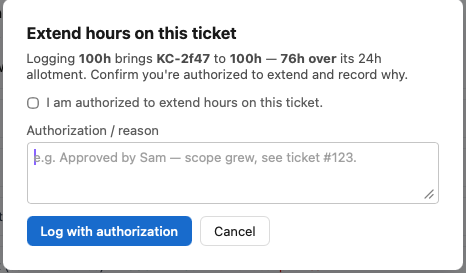
The accountability was never the block. It is the record the block produces.
Project Overview: where the tribal knowledge goes
Ask a team where the client’s screenshots live and watch what happens. Somebody thinks it is the shared drive. Somebody else remembers a Slack thread. The person who actually knows is on PTO. That knowledge is not written down anywhere, it is distributed across three people’s memory, and every project has a dozen facts shaped exactly like it. Who do we call when the client’s SSO breaks. Which repo is the real one. How do we bill design time on this account.
The usual fix is another document. A wiki page, a Confluence space, a pinned doc in a channel. That fails for a reason worth naming: it is somewhere else. It is one more surface to remember to open, one more thing to keep current, and the moment it drifts out of date nobody trusts it and everybody goes back to asking in chat.
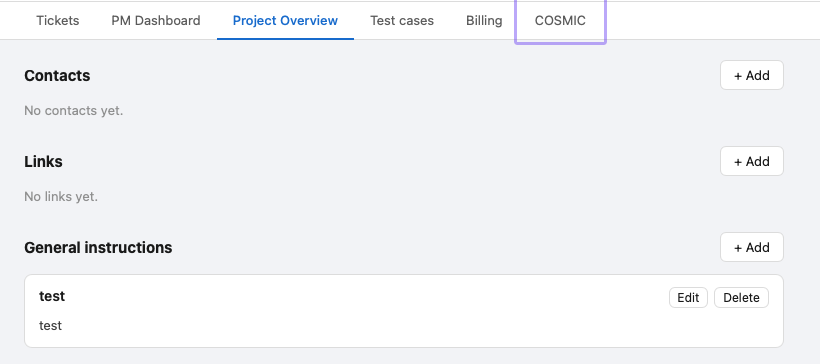
So I did not add a document. A new Project Overview tab puts that context where the work already is. Developers are in hate day in and day out. PMs are in it monitoring. The link to the client’s screenshots does not need a hunt, it is on the project you already have open, one tab over from the tickets. Contacts (internal or client, with a chat handle), links (repo, drive, docs), and Markdown instructions for the account’s own rules. Not a new place to look. Fewer places to look.
A small aside that turned out to matter. I named the link list “Links,” not “Resources,” because resources already means people in the scheduler. Overloading the word would have quietly confused both the code and the person reading the screen.
Work versus overhead: two budgets, because they are two budgets
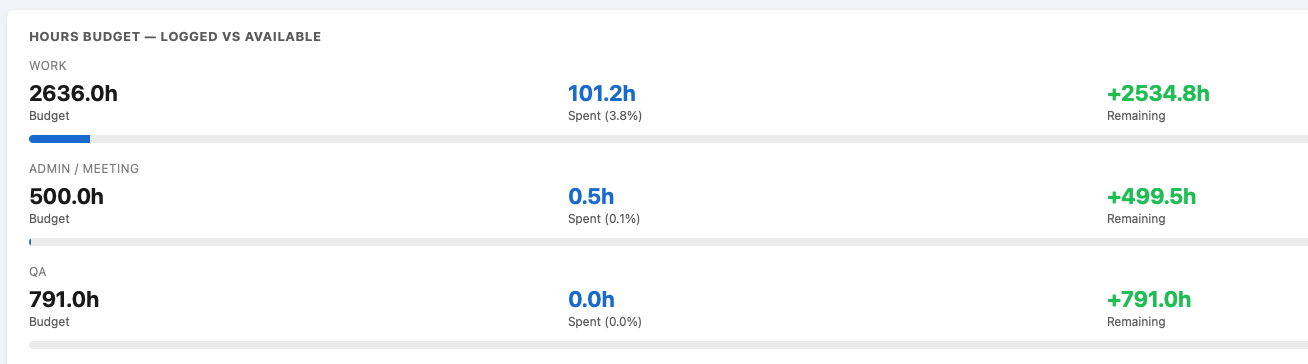
The single cap split into two pools: work hours (task, dev, design) and admin / meeting hours (meetings, administration). Burning your engineering budget on standups is a genuinely different failure than running long on the build, so the dashboard burns each pool down on its own.
Hours budget · logged vs available

  Work             120 / 400h   30%
  Admin / meeting   88 / 100h   88%   WATCH
And because meeting and admin tickets log their hours the moment they are created, spinning one up draws its pool down on its own. No separate bookkeeping step.

Hours at risk: the warning before the wall
Strict time has a limit. It fires at the wall. By the time a developer is asking permission to extend, the hours are already spent and the conversation is about absorbing damage that has happened. That is a conversation worth having, but it is the second best one.
The real problem is not that people overrun. It is that you do not know it is coming. Slip does not announce itself. A ticket that is going to run twice its size looks exactly like a ticket that is going fine, right up until it does not.
So the last change was a deletion. The dashboard had a table listing every ticket, the kind of table everyone scrolls straight past, which is another way of saying it had a report nobody read. I removed it and put a watchlist in its place: active tickets that have already burned 90% or more of their allotted hours, the over-budget ones in red at the top.
Hours at risk · active tickets ≥ 90% of allotment

  TKT-219   11.0 / 8.0h   138%   OVER
  TKT-184    7.5 / 8.0h    94%   AT RISK
Ninety percent is the number because that is where a question is still useful. TKT-1234 was sized at a hundred hours and ninety are gone. The PM can now walk up and ask the only question that matters: are the last ten enough to finish it? Sometimes yes, the thing is nearly done and this is noise. Sometimes the honest answer is no, we are half done, and now the PM knows about a fifty hour problem while there are still fifty hours of runway to do something about it. Rescope it, reassign it, go back to the client, cut something else. All of those are options at ninety percent. None of them are options at a hundred and forty.
That is the pairing. Strict time makes the overrun visible when it happens. Hours at risk makes it visible before it happens. The first one produces a record, the second one produces a decision.

A project manager does not need a list of all the work. They need the short list of things about to blow the budget, while there is still time to act on it. “Are we going to make it, or do we adjust?” That question finally has a section of its own.
Four things that kept being true
- Honest approximation over false precision. If a number is rough, label it rough. The sizing budget is more useful because it does not pretend to be an estimate.
- Simpler wins. The feature you do not build cannot break, cannot confuse and cannot rot. One number beat a reconciliation engine.
- Guardrails need escape hatches. A wall people cannot get through is a wall people route around. Let them through, but make them sign for it.
- Actionable beats exhaustive. Do not show everything. Show the short list that needs a decision today.
What comes next
A ticket tracker tells you what exists. By the end of the day, this one tells you whether you are going to make it. Same data, better questions.
The next question is the one before the project starts. Every finished project in hate is now a record of what a piece of work of that shape actually cost, not what someone guessed it would cost. Match a new engagement against the profile of the old ones and the sizing budget stops being a t-shirt guess and starts being history.
If this is your kind of problem, the two earlier pieces on project management are Part One and Part Two .